
From this page you can manager Power Plates minutes usage.
It will display the minutes left, used, last purchased power plates course, active course and usage history.
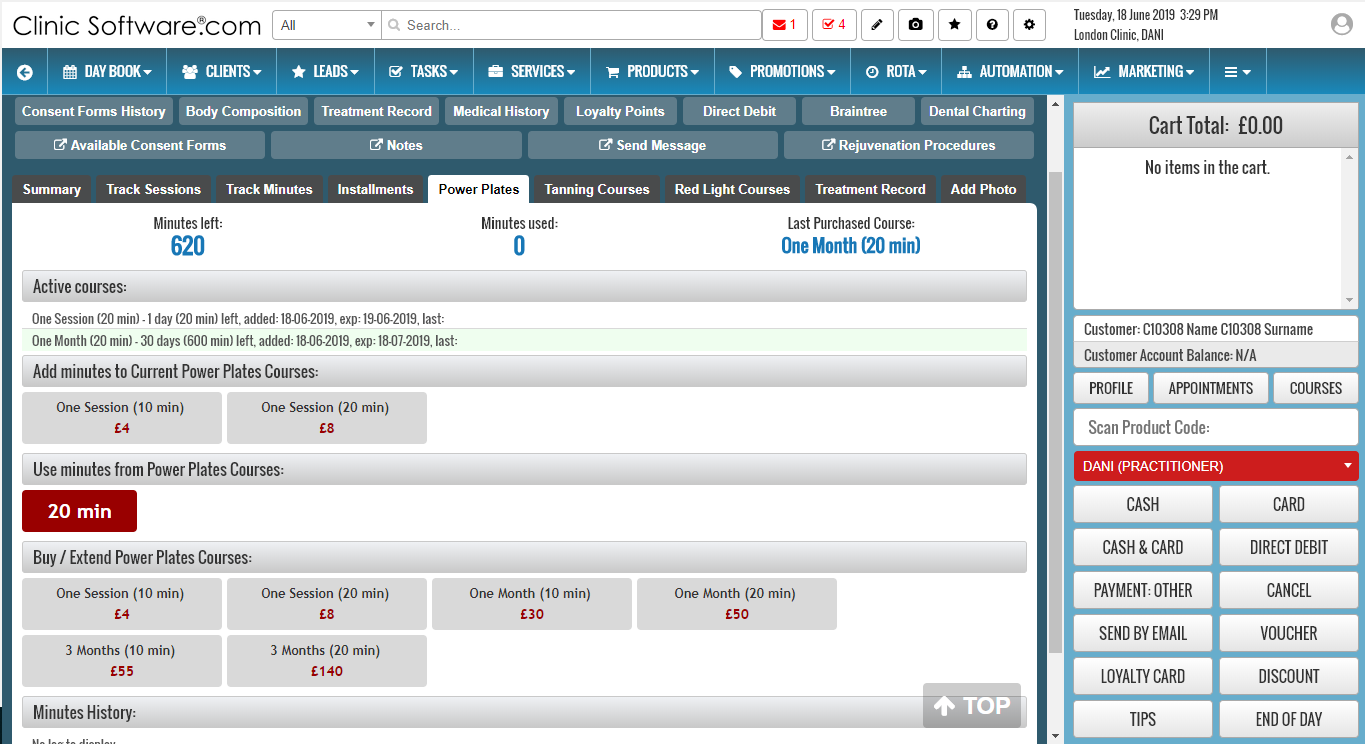
The Power Plates page is divided into 4 sections:
- Active Courses – courses that have minutes available and have not expired
- Add minutes to Current Power Plates Courses – buy new minutes per session (this day only)
- Use minutes from Power Plates Courses – use bought minutes
- Buy / Extend Power Plates Courses – buy new minutes in per session or 1-3 months
- Minutes History – history of how many minutes were used at what date and from what course
Power Plates minutes are organised in courses:
- Per Session (can only be used on the day they were bought)
- 1 Month (10 and 20 min variants)
- 3 Months (10 and 20 min variants)
Power plates minutes and prices can be configured from the Admin Area -> Power Plates Courses.
If the client purchases the 1 month or 3 months (10 minutes) it can only use 10 minutes per day for the duration of the course (1 month).
Selling Power Plates courses
To sell power plates courses click on the course from the “Buy / Extend Power Plates Courses:” section.
The course will be added to the cart, from there press CASH/CARD to complete the payment.
Using Power Plates minutes
To use power plates minutes, in the “Use minutes from Power Plates Courses” there will be buttons with the number of minutes that the client can use from each of the purchased course.
If there are no buttons in that section it means that the client has already completed the quota for the day (e.g. for the 1 month course) and has to buy another course (use the buttons from the “Add minutes to Current Power Plates Courses:” to sell a new course for the day if required).