
• Home

ClinicSoftware.com Knowledge Base ClinicSoftware.com Knowledge Base

ClinicSoftware.com Knowledge Base

  • HOW IT WORKS
    • Software Features
    • Marketing Features
    • Online Booking
    • Paperless Features
    • Photo And Draw Features
    • Tracking Features
    • Sell Cycle Features
    • Fully Responsive Features
    • Business Reports Features
    • Automated Features
    • Reminders Features
    • Apps Features
    • Multi Location Features
    • Add-Ons
  • WHO IT’S FOR
  • MARKETING
  • MORE
    • Support
    • Find-Us
    • Migrate To ClinicSoftware
    • How We Provide Training
    • Partner With Us
    • Academy
    • Support Chat
    • Blog
    • Editions
    • ClinicSoftware.com TV
    • GDPR
    • ICD-10 Database
    • PCI-DSS Compliant
    • Cloud Hosting
    • Latest UK Shows
    • UK Press
  • Modern Edition
  • CLOSE / RETURN TO SOFTWARE
Home Knowledge Base 9.3 ADMIN AREA 45. CUSTOM FIELDS

45. CUSTOM FIELDS

20th June 2019 Posted in: 9.3 ADMIN AREA Hits: 731

The custom fields can be changed from Admin > Custom Fields.

When adding a custom field you can specify if the field will be used for a contact, lead or both.
If lead or contact_lead is selected then the field will be displayed under the new lead window.

If a field is marked contact_lead, the value of the field will be transferred to the client side as well upon conversion of the lead.
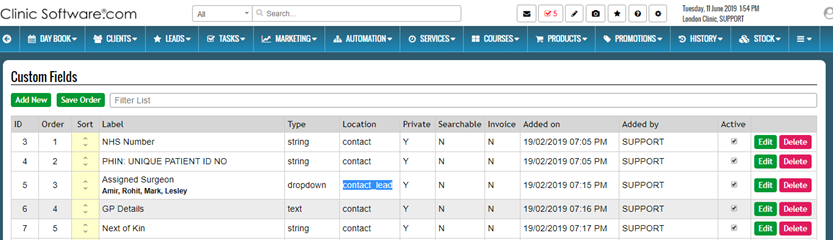
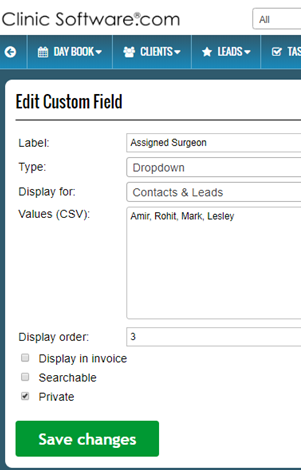
If a field is marked as private then it will only be displayed in the details window after you click on the lead. If the private checkbox is unticked then the field will be displayed as part of the leads table.

© 2017 ClinicSoftware.com